Back up every original photo and video. Over your own Wi-Fi.
PixLaundry sends full-quality photos and 4K videos from your phone to the devices you already own — a spare Android phone, a Mac, or a Windows PC. Every file is checked on arrival, and next time only the new ones go.
Move originals to a drive or phone you already own.
Scared to hit delete.
iCloud Photos is a sync, not a backup — delete on your iPhone and it’s gone everywhere. Without a copy you trust, freeing up space feels like gambling with memories.
Every file is fingerprint-checked on both ends, so you know the copy is whole.
4K video eats everything.
ProRes files can be up to 30 times larger than regular HEVC video. Messaging apps compress it, cables are slow, and cloud uploads crawl.
Saves to any folder you pick — external drives included — as Year / Year-Month, with file dates set to when each shot was taken. Lives in the menu bar.
On the device that will keep your photos — a spare Android phone, a Mac, or a PC. It shows a 6-digit PIN.
Pair from your phone
Your phone finds the receiver on the same Wi-Fi automatically. Type the PIN once; pairing is remembered.
Pick a starting point, tap Send
Today, last week, last month, this year, a date, one photo — or everything. After that, only new photos go.
The apps
What it looks like
Screens from the current builds, captured on an iPhone and an Android phone talking to each other over Wi-Fi.
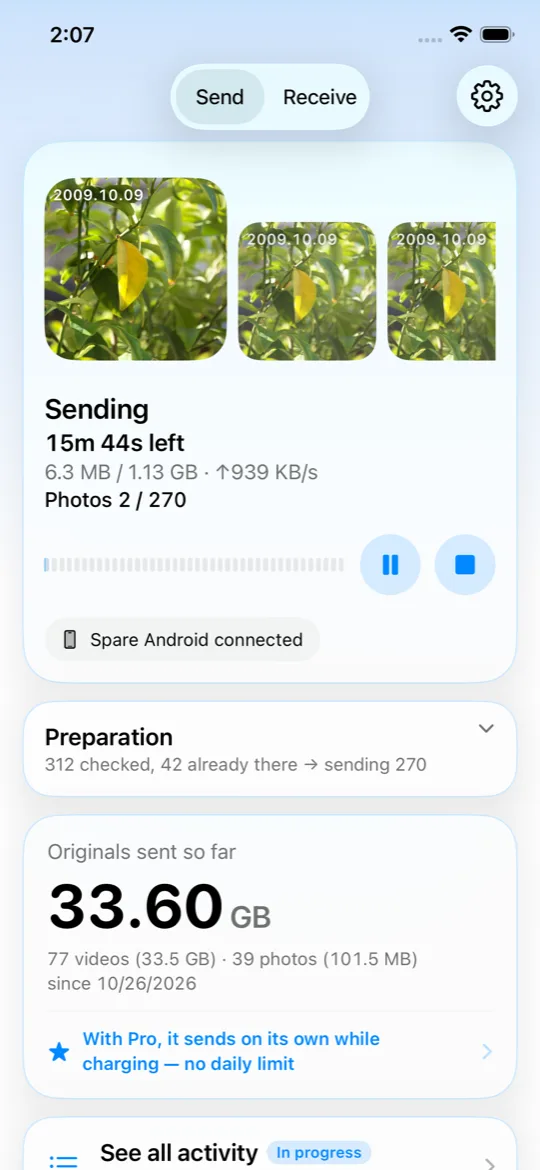
iPhone · SendSendingThe photo going now, time left to the second, speed, photo and video counts — and pause that stops in place.
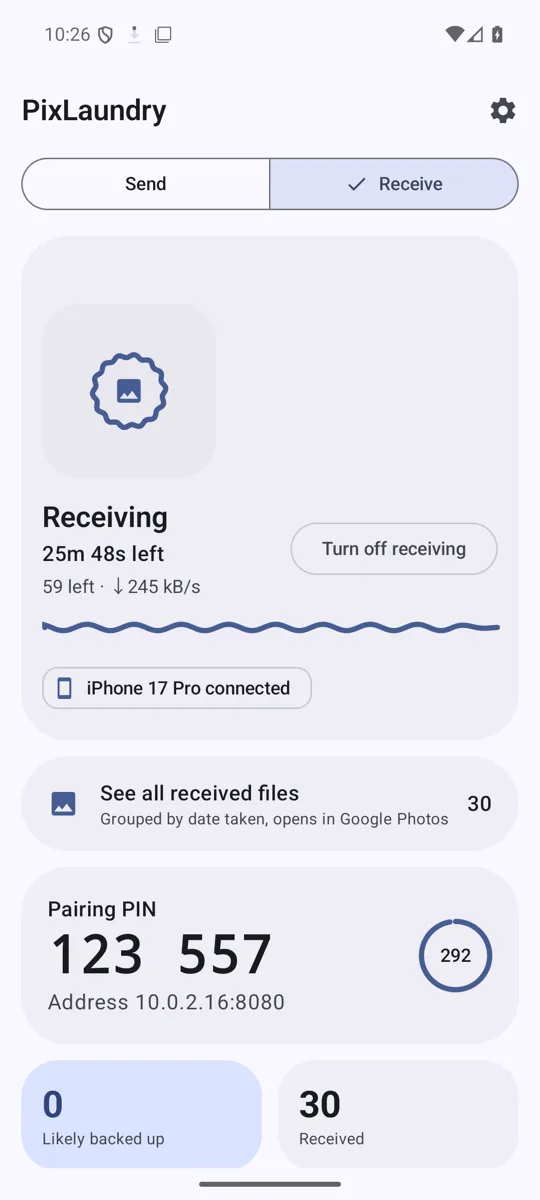
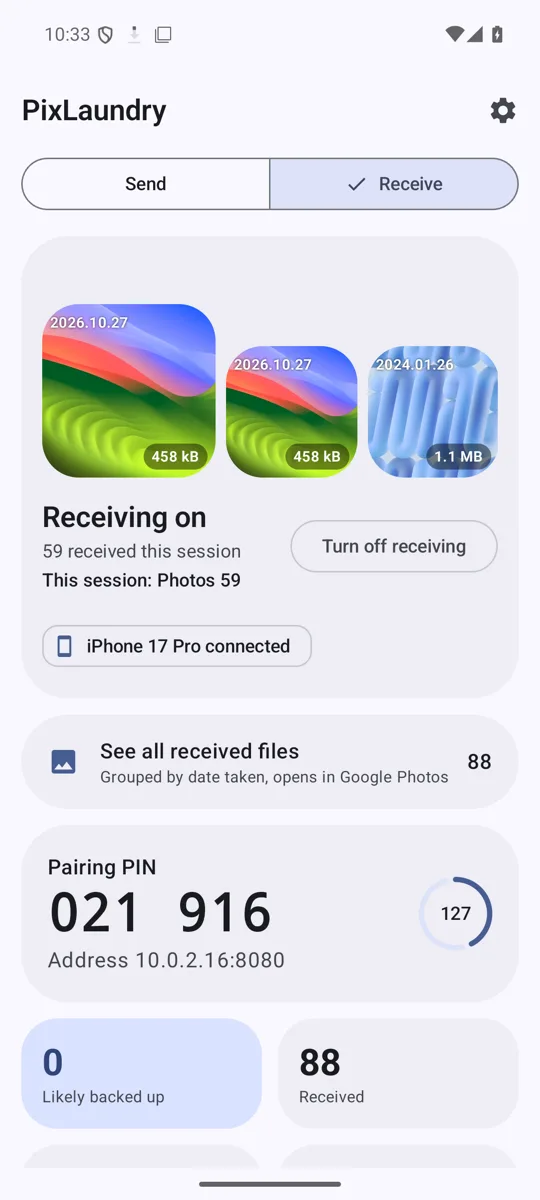
Android · ReceiveReceivingEach file is checked as it lands. The PIN and address stay on screen for the next phone that wants to pair.
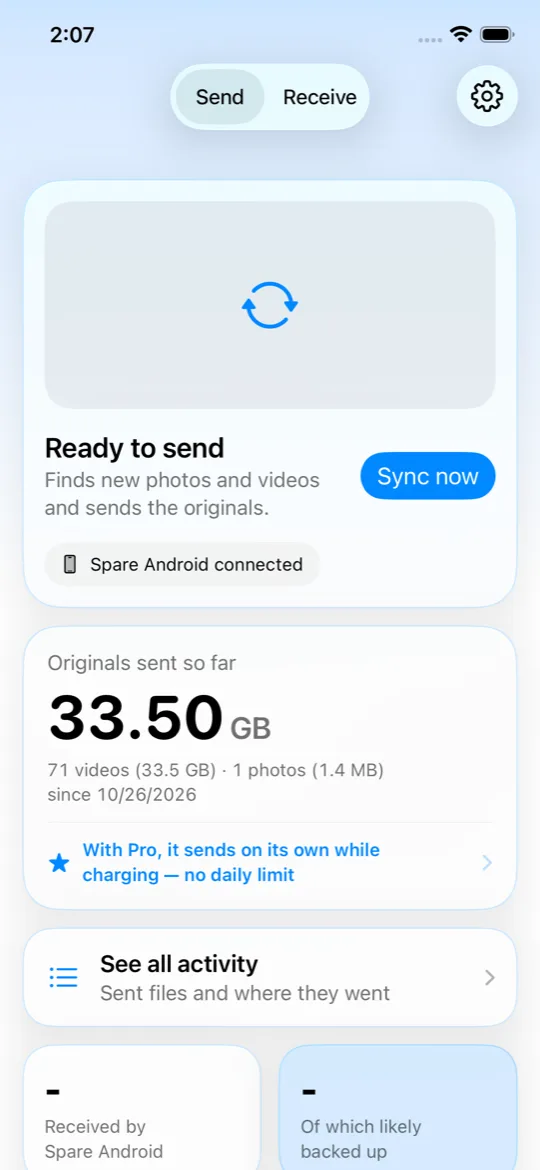
iPhone · HomeReady to sendOne tap sends what’s new. The card keeps a running total of originals that have left the phone.
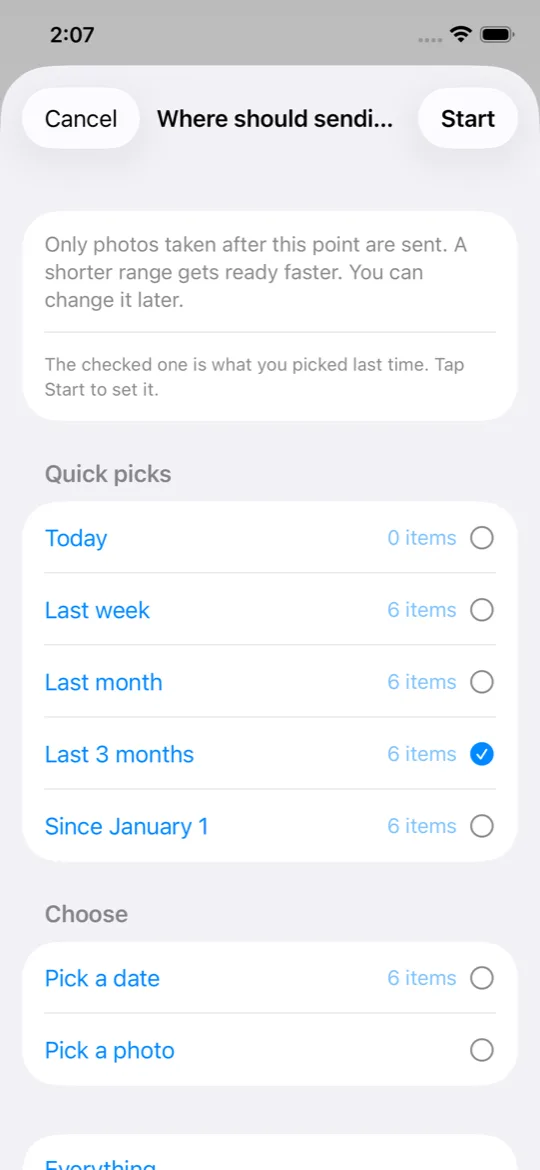
iPhone · RangeChoose where to startToday, last week, last month, a date, one photo — or everything. A shorter range gets ready faster.
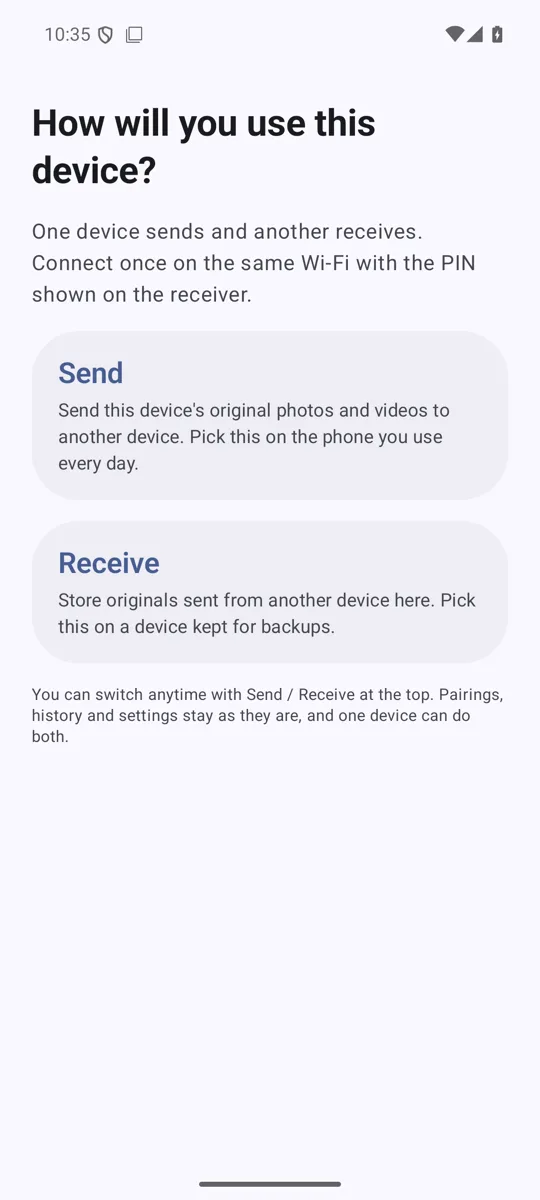
Android · First runSend or receive — your pickEvery phone can play either role. The Android sender has the same range picker, sync button and Pro automation as the iPhone one.
Android · ReceiveWaiting with a PINTurn receiving on once; it keeps listening with the screen off and restarts after a reboot.
Built for big libraries
Designed for libraries of 100,000+ photos — and to never miss one.
Remembers everything it has sent
Each receiver keeps a permanent record of what it got — even after the file is cleaned up. Photos saved late from chats or AirDrop are picked up too, and a full check runs weekly.
TodayLast weekLast monthThis yearPick a dateEverything
Verified, byte for byte
Your phone fingerprints each file while it streams; the receiver does the same while it writes. If they differ, that file is sent again. Empty or truncated files are never counted as done.
iPhone9f2c51e0 … 7b04a41e
Receiver9f2c51e0 … 7b04a41e
Match — counted as sent
Watch it happen
The photo being sent, second-by-second time left, speed, photo and video counts — and a plain reason if anything fails. Pause stops in place; resume picks up the same file.
Laundry PRO
Your biggest videos, sorted by size. When you need to back something up again, re-send it as a fresh copy — same picture, same date, “_px” added to the name.
Set it and forget it PRO
iPhone: a Shortcuts automation starts a sync when you plug in or join home Wi-Fi. Android: every few hours while charging on Wi-Fi.
Safe by default
The receiver never deletes on its own. Optional Auto mode (Pro, Android) clears week-old files only when space runs out.
Dates stay right
Files keep their original capture time, so they sort where they belong in folders and in Google Photos. If a photo or video arrives with its date stripped — say, saved from a messenger app — the Android receiver writes the capture time into the file’s date fields; the picture itself is untouched. A screen recording can still show a few minutes off on the phone.
The whole family, one receiver
Pair several phones with the same receiver. Each one is listed by name and can be unpaired anytime.
Two homes for every original
On iPhone, one run can send to several receivers — the spare phone and the Mac, say — and the activity list shows where each file went.
Big files pick up where they stopped
If Wi-Fi drops halfway through a 3 GB video, the next run continues from the bytes the receiver already has instead of starting over.
Use cases
Who it’s for
Different reasons, same goal: get originals off the phone and somewhere safe — without paying every month.
Popular setup
The original Google Pixel in your drawer
Google’s own help page says the original Pixel (2016) gets unlimited storage in Original quality at no charge in Google Photos. That’s why people on r/GooglePixel keep one plugged in at home as a backup station — and ask how to get their partner’s iPhone photos onto it too.
The usual answers: copy files over a cable, or keep a sync app open and watch it.
PixLaundry is the missing link: install the free receiver on the Pixel, and your iPhone (or any Android) delivers originals over Wi-Fi. Google Photos on the Pixel takes it from there.
PixLaundry is not affiliated with Google and doesn’t provide or guarantee any cloud storage. Storage benefits are Google’s, under Google’s terms, and may change. Google doesn’t say how it treats photos taken on other phones. Sources: Google Photos Help, r/GooglePixel thread (Jan 2026).
Your iPhone or GalaxyOriginal HEIC · 4K HEVC · ProRes
PixLaundry over home Wi-Fi · verified ✓
Original Pixel (2016), plugged inFree receiver · DCIM/Camera
Google Photos backup on the Pixel
Google PhotosStorage per Google’s terms
Tired of paying for iCloud
Send everything to a Mac or PC with a cheap external drive, confirm the copies, then clear space on your iPhone and in iCloud.
Parents with years of kid videos
Every phone in the house pairs with one receiver. New clips go automatically while the phones charge overnight (Pro).
Creators shooting 4K and ProRes
Multi-gigabyte clips go straight to your editing machine at Wi-Fi speed — no re-encode, no cloud round-trip.
iPhone owners on Windows
No iTunes, no cable, no “device unreachable.” Originals land in tidy year/month folders on any drive.
Switching to Android — or reviving a spare
Move your library from iPhone to Android in full quality, or turn last year’s phone into a home photo box. Android to Android works too.
Local-first, privacy-minded
Your photos travel only between devices you own, on your network. Nothing is uploaded to us — there’s no “us” server to upload to.
Prices in USD; your store shows local pricing. Pro removes app limits — it doesn’t include any cloud storage.
Privacy
PixLaundry never sends your photos beyond your Wi-Fi.
PixLaundry has no servers, so there is nothing for us to collect. Here’s exactly what that means — including the one thing to know.
Device to device, on your networkWe never see your photos. The app sends them only to the devices you paired, without passing through the internet.
No account, no sign-inNothing to register. Pairing uses a one-time PIN; the receiver stores only a hash of the token.
No ads, analytics or crash trackersDiagnostics stay on your device unless you choose to send them to support yourself.
Use it on a network you trustTransfers inside your local network aren’t encrypted. Use your home Wi-Fi, not public hotspots.
FAQ
Questions, answered honestly
Do I need a Google Pixel?
No. Any Android 10+ phone, another iPhone, a Mac (macOS 13+) or a Windows 10/11 PC can receive. An original Pixel is a popular choice because of its Google Photos storage benefit — see the Pixel guide — but it’s not required.
Does PixLaundry give me cloud storage or unlimited Google Photos?
No. PixLaundry only moves files between your own devices on your Wi-Fi. Any cloud backup — including storage benefits on some Pixel phones — comes from that cloud service under its own terms, which can change. We’re not affiliated with Google or Apple, and we can’t make promises on their behalf about storage or accounts.
Are my photos compressed or converted?
No. The original file is sent as-is: HEIC, ProRAW, ProRes, 4K HDR. For edited photos, the version you currently see is sent. Both devices compute a SHA-256 fingerprint and compare; on a mismatch the file is sent again.
Does it work over the internet or cellular?
No — both devices must be on the same Wi-Fi. If your router blocks device discovery, connect by typing the receiver’s IP address.
What happens if the transfer is interrupted?
Each file is recorded on the receiver the moment it’s saved. Next time, PixLaundry compares and sends only what’s still missing.
Will it delete photos from my phone?
Never on its own. Laundry has an optional “delete originals” that only touches files the receiver has a record of, after two confirmations (the app’s and your phone’s). On iPhone they stay in Recently Deleted for 30 days. If you use iCloud Photos, deleting on the iPhone deletes everywhere — so check your backup first.
Does it run in the background on iPhone?
iOS limits background transfers for every app. With Pro, a Shortcuts automation can start a sync when you plug in or join home Wi-Fi, and on iOS 26 or later it asks the system to keep a started sync going after you leave the app, for as long as iOS allows. For very long first-time transfers, keeping the app open is the most reliable.
What about Live Photos?
Today PixLaundry sends the still photo of a Live Photo. The motion part isn’t sent yet.
What is Laundry?
Laundry re-sends the files you pick as fresh copies, for when you need to back something up again. The picture and video stay the same, the capture date is kept, and “_px” is added to the name so you can tell the copy apart.
How much does it cost?
Receiving is free on every platform. Sending is free for up to 50 items a day and files up to 100 MB. Pro is a one-time $9.99 purchase (your store shows local pricing) that removes those limits and adds automation and Laundry.
Your phone isn’t a hard drive.
Give every original a real home — on devices you already own.